Part of the "IDAEO Zone" topic shelf →
Understanding Your AI Passport: From Your Passport to the IDAEO Customer Journey
After you check your website at aeo.idaeo.ai, you get an AI passport. This guide walks you through what the score, stamps, report and tools each mean, and which step of the IDAEO customer journey S1–S10 each one maps to.
Look at the passport in your hand → understand each item → place it on the IDAEO S1–S10 journey → compare with the theory in the book → see what to do next.
Start with your passport
After you check your website at aeo.idaeo.ai, you see this page. The red numbers in the picture match the notes below and show where each item sits on the IDAEO journey.
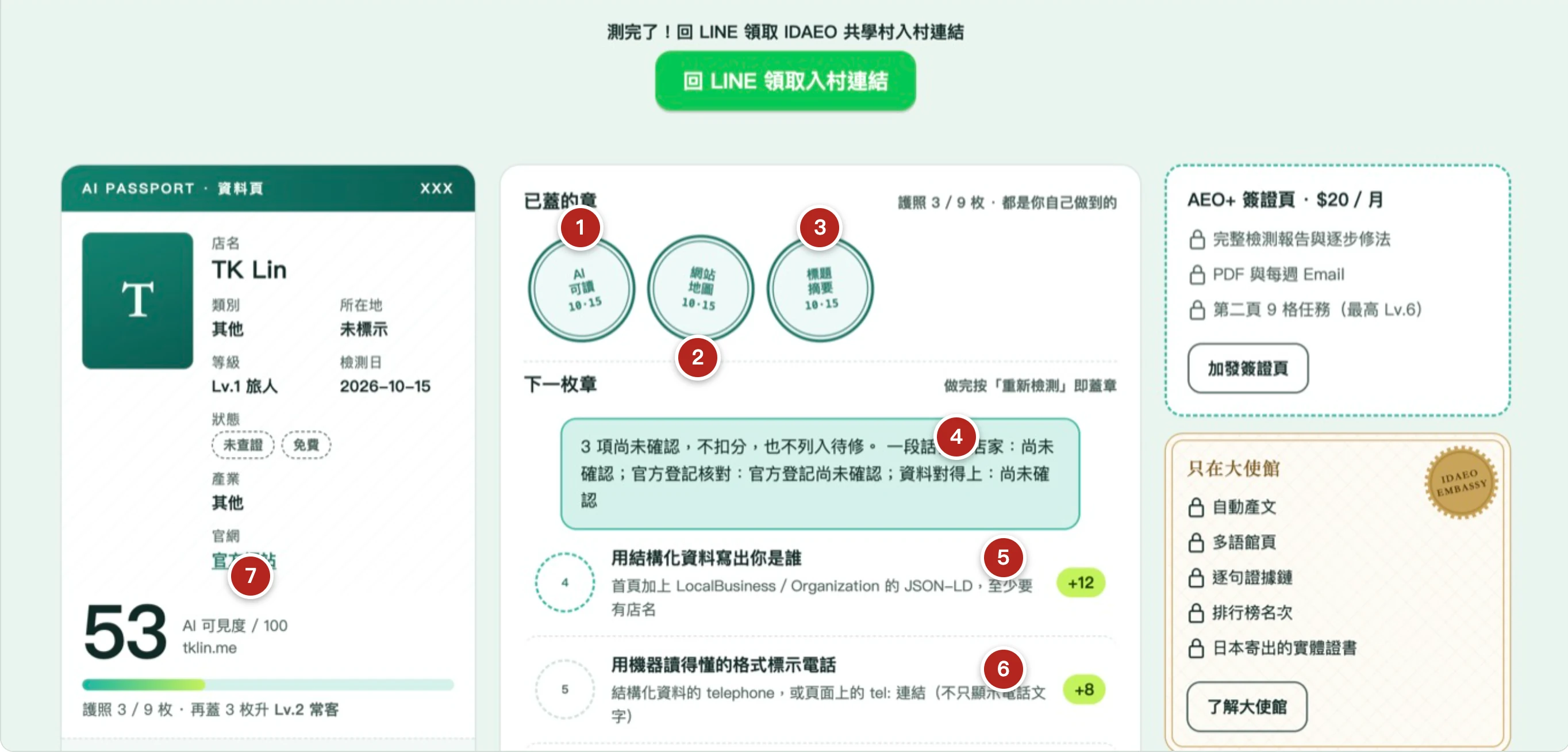
- S2 In reach
- S4 Indexable
- S4 Indexable
- S1 · S7 Ready · Credible fact base
- S1 Ready
- S1 Ready
- Score: items from S1–S4
The scored items are all in S1–S4 (the business gets its data ready, lets AI in, and makes its information indexable). Registry checked also counts toward the score once there is official registration data and it has been confirmed. The other items in S7–S9 do not count toward the public score: they only look at “whether the entry points and fact base are ready”. Whether AI came to read or arrived at your site, and whether customers showed up, are measured first-party by IDAEO. Whether AI mentions you and answers correctly is tracked by IDAEO's real-world tests. S6 mentions and S10 return are not measured by the passport.
What each item is
The passport does one thing only: it checks whether your website meets the conditions for AI (ChatGPT, Claude, Perplexity…) to read it and understand it. The check follows public criteria and compares you only with yourself. It does not guarantee that AI will read you, and it certainly does not guarantee a recommendation.
Score (out of 100): S1–S4
- Completed weight ÷ assessed weight × 100
- The 9 basics total 80, plus 5 each for HTTPS and the canonical URL: total weight 90
- The goal line is 70; unconfirmed items cause no deduction
- It measures the S1–S4 foundation
Stamps (9 slots): S1 · S2 · S4 · S7
- Business data, About text, Phone listed, Address listed, Opening hours → S1 Prepare
- AI readable → S2 the crawler can get in
- Site map → S4 makes indexing easier
- Title summary → S4 Indexable (the business prepares it first in S1)
- Registry checked → S7 a credible fact base (counted only once there is official registration data and it has been confirmed; unconfirmed means no deduction)
- A stamp is given only after you fix the item and press “Check again”; once earned, it is kept permanently
Report (four categories): S1–S5 + notice only
- AI crawler access: Training → S3, Search → S4, User-triggered → S5
- Technical readability: Homepage opens, HTTPS, response time → S2 (Business structured data, Sitemap and Title and description are also in this category; they map to S1 and S4)
- Content completeness: name, address, phone, opening hours, introduction → S1
- Content freshness: Sitemap has update dates → S4
- High = AI can't read you; fix these first. “Notice only” causes no deduction
Tools: S1–S5
- AI Business Card: Business data, Phone listed, Address listed, Opening hours → S1
- AEO Tool: robots.txt → S2–S5 (depending on the crawler's purpose)
- How AI Sees You: how much text AI can read → About text (S1), Title summary (S4)
- Tools never stamp; after you follow them, you must check again for it to count
Not in the public score: S7 · S8 · S9
- Business details match → S7 fact base (counted on the AEO+ visa page)
- Booking entry, One-tap contact, Usable forms → S8 whether the entry points are ready (Booking entry is counted on the AEO+ visa page)
- Directions to the shop → S9 guiding people to the shop
- These only look at whether entry points and facts are ready; they do not mean the task got done or customers showed up
Growth data: S2 · S9
- AI crawler visits → S2 (may be a sampled estimate)
- Clicks from AI → S9 customers clicking through from AI
- It measures your business page on IDAEO, not your official website
- Only recorded points are drawn; nothing is filled in
On the journey: step by step
The AI passport's “scored” items are mainly in S1 → S4, the foundation for the rest of the journey. There is also Registry checked in S7 (counted once there is official registration data and it has been confirmed). S5 and the other items in S7–S9 do not count toward the public score, and the passport does not measure S6 or S10. Below, each step lists what in the passport maps to it: Stamp = a passport stamp; Report = an individual check in the report (only weighted ones count toward the public score); Notice = not in the public score; Tool; Data = Growth data.
S1 Prepare (Ready · Is the data complete?)
Phase One: Readiness
- Stamps: Business data, About text, Phone listed, Address listed, Opening hours
- Report: name, address, phone, opening hours, introduction, questions and answers
- Tools: AI Business Card (Business data, Phone listed, Address listed, Opening hours), How AI Sees You (About text)
S2 Crawl (In reach · Can they get in?)
Phase Two: AI Information Acquisition
- Stamp: AI readable (robots.txt does not block the major AI crawlers from the homepage)
- Report: Homepage opens, HTTPS, response time, AI crawler access
- Tool: AEO Tool (robots.txt)
- Data: AI crawler visits
S3 Train (Learnable · Can it be used?)
Phase Two: AI Information Acquisition
- Report: Training crawlers (whether to allow them is the business's choice)
- Tool: AEO Tool (robots.txt)
- Scoring: the 4 crawlers behind the AI readable stamp include Training ones
S4 Index (Indexable · Is it indexed?)
Phase Two: AI Information Acquisition
- Stamp: Site map (lists your URLs to make indexing easier; indexing is not guaranteed)
- Stamp: Title summary (S4 Indexable; the business prepares it first in S1)
- Report: Search crawlers, Canonical URL (scored); Search indexing, Official URL, Sitemap has update dates (not in the public score)
- Tools: AEO Tool (robots.txt), How AI Sees You (Title summary)
S5 Ask AI (Readable · Came to read?)
Phase Three: AI-Assisted Decision and Action
- Report: whether the User-triggered crawler is blocked (not in the public score; counted on the AEO+ visa page)
- Tool: AEO Tool (robots.txt)
S6 AI Mention (Pickable · Were you mentioned?)
Phase Three: AI-Assisted Decision and Action
- Not measured by the passport: mentions are tracked by IDAEO's real-world tests
S7 AI Answer (Credible · Did it get it right?)
Phase Three: AI-Assisted Decision and Action
- Stamp: Registry checked (a credible fact base; counted only once there is official registration data and it has been confirmed; unconfirmed means no deduction)
- Notice: Business details match (fact base, counted on the AEO+ visa page; whether AI answers correctly is checked through real-world tests)
S8 Act (Doable · Can it get it done?)
Phase Three: AI-Assisted Decision and Action
- Notice: Booking entry, One-tap contact, Usable forms (whether the entry points are ready; completion is not tested; the AEO+ visa stamp is given only when a usable booking entry is confirmed)
S9 Visit (Visitable · Did they show up?)
Phase Four: Conversion & Return
- Notice: Directions to the shop (guiding people to the shop; this is not the same as showing up)
- Data: Clicks from AI (customers clicking through from AI to your business page on IDAEO)
S10 Return (Recurring · Did they come back?)
Phase Four: Conversion & Return
- Not measured by the passport: returning loops back to S5
The passport's scored items are mainly in S1–S4: the business gets its data ready, lets AI in, and makes its site indexable. There is also Registry checked in S7 (counted once confirmed). From S5 on, the passport only checks whether reading is allowed and whether the fact base and entry points are ready. To find out whether these things actually happen, look at IDAEO's measurements: it measures S5 reads, S8 site arrivals and S9 customer visits with first-party data, and tracks S6–S7 mentions and answers through real-world tests. This is also the part the IDAEO learning village learns and does together.
The theory in the book: the AI customer journey (Figures 2-1 and 2-2)
Chapter 2 of *IDAEO: Marketing in the Age of AI* divides the AI customer journey into four phases and ten steps: S1 Readiness, S2–S4 AI Information Acquisition, S5–S8 AI-Assisted Decision and Action, and S9–S10 Conversion & Return. The book says “AI Impressions come first; the rest of the journey follows”. What the passport checks is exactly the foundation of this journey.
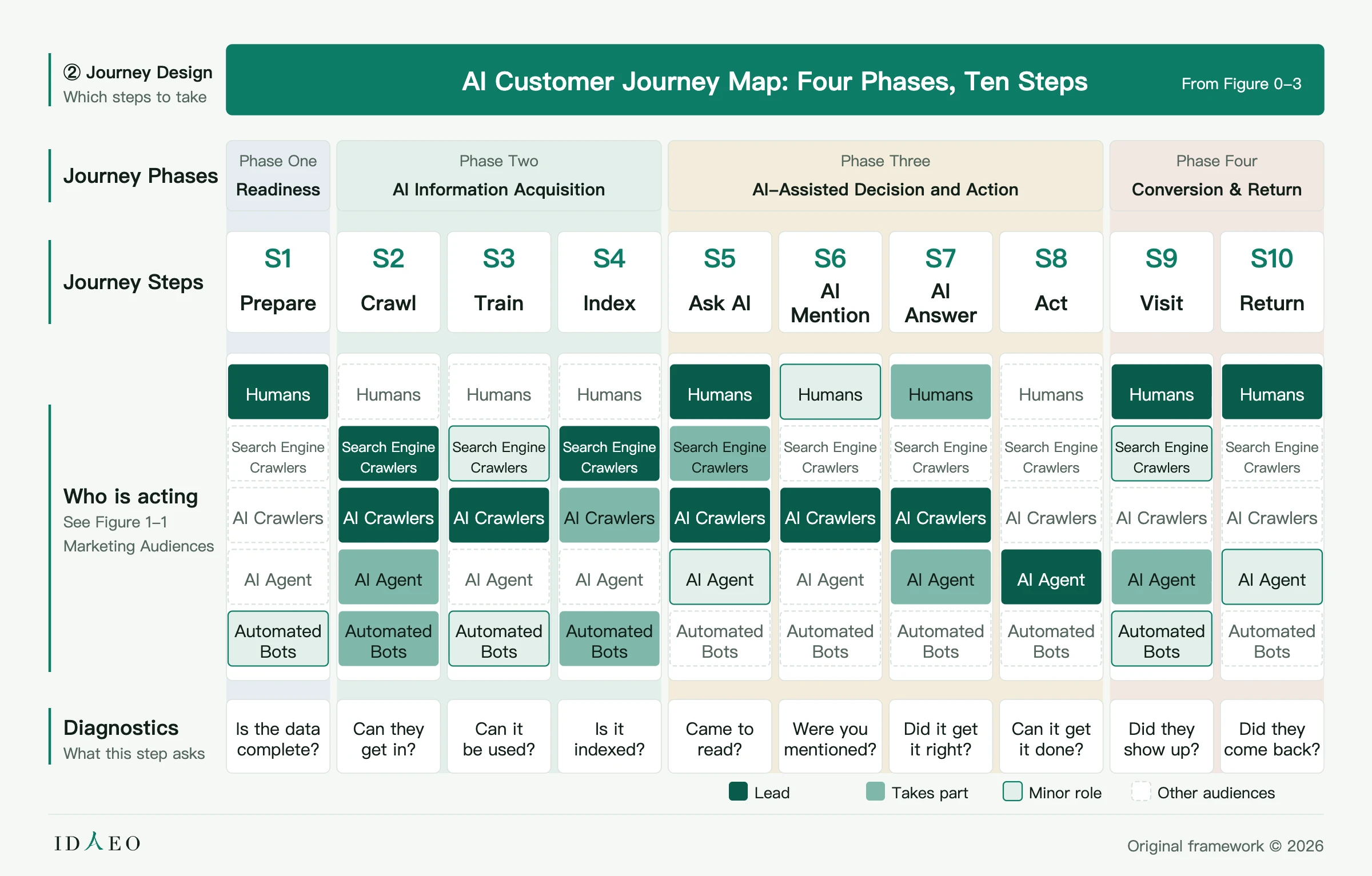
| Phase | Steps and gates | What this step asks |
|---|---|---|
| Readiness | S1 Prepare (Ready) | Is the data complete? |
| AI Information Acquisition | S2 Crawl (In reach) · S3 Train (Learnable) · S4 Index (Indexable) | Can they get in? · Can it be used? · Is it indexed? |
| AI-Assisted Decision and Action | S5 Ask AI (Readable) · S6 AI Mention (Pickable) · S7 AI Answer (Credible) · S8 Act (Doable) | Came to read? · Were you mentioned? · Did it get it right? · Can it get it done? |
| Conversion & Return | S9 Visit (Visitable) · S10 Return (Recurring) | Did they show up? · Did they come back? (S10 loops back to S5, forming a cycle) |
The ten gates in the table come from Figure 2-2, the Journey Diagnostics Gate Map. See them in the book: Figure 2-1, Figure 2-2; the whole chapter: Chapter 2.
Next step: follow the journey in order
- Fill in S1 first (Is the data complete?): look at the passport's “Next stamp”: Business data, Phone listed, Address listed, Opening hours, About text. Check Business data, Phone listed, Address listed and Opening hours with “AI Business Card”, and About text with “How AI Sees You”.
- Then take care of S2–S4 (can they get in, can it be indexed): first fix any “High” severity issues in the report so that the major AI crawlers are not blocked, the homepage opens, and HTTPS is enabled. Then add a sitemap (severity Medium). To let crawlers in, you can use “AEO Tool” to produce a robots.txt.
- Then S5 (Came to read?): check in the report whether the “User-triggered” crawler (ChatGPT-User) is blocked (not in the public score; counted on the AEO+ visa page). After fixing steps 1–3 above, press “Check again” and look at the report results, stamps and score.
- From S6 on: mentions, whether answers are right, getting things done, customers showing up — learn these together with everyone at the IDAEO learning village, where TK Lin teaches from real-world tests.
This article is based on Chapters 2 and 3 of *IDAEO: Marketing in the Age of AI* and the “Checks and criteria” page at aeo.idaeo.ai. The mappings were cross-checked by several AIs and verified sentence by sentence against the source. The criteria are as stated on the check site's public page: aeo.idaeo.ai/methodology/zh/. If you get stuck, type “敲碗回報” (request or report) in the LINE official account “IDAEO 村口服務台” (IDAEO Village Help Desk).
FAQ
- What score counts as good?
- The goal line is 70. But what matters more is “whether you improved since last time”: check again after each fix and see whether the stamps and score change.
- スコアは何点なら良いですか? — 目標ラインは 70 です。ただ、もっと大切なのは「前回より進んだか」です。ひとつ直すごとに再診断して、スタンプとスコアが変わったか見てください。
- What score counts as good? — The goal line is 70. But what matters more is “whether you improved since last time”: check again after each fix and see whether the stamps and score change.
- My score is very low. Does that mean my website is bad?
- No. The score only measures “whether AI can read and understand you”. Many beautifully designed websites are actually unreadable to AI. These are basics you can fix: work through “Next stamp” one item at a time and check again after each one to confirm.
- スコアがとても低いのは、サイトがひどいということですか? — いいえ。スコアが測るのは「AI が読めるか、理解できるか」だけです。デザインがきれいなサイトでも、AI にはかえって読めないものが多くあります。これは補える基本です。「次のスタンプ」のとおりに一つずつ直し、そのたびに再診断で確認してください。
- My score is very low. Does that mean my website is bad? — No. The score only measures “whether AI can read and understand you”. Many beautifully designed websites are actually unreadable to AI. These are basics you can fix: work through “Next stamp” one item at a time and check again after each one to confirm.
- What are stamps, and how do I earn them?
- The 9 stamp slots are 9 basics that let AI read your website. Finish one, then press “Check again”. Once it is confirmed done, you get the stamp, and a stamp once earned is kept permanently.
- スタンプとは何ですか?どうすれば押せますか? — 9 マスのスタンプは、AI があなたのサイトを読むための 9 つの基本です。一つ済ませたら「再診断」を押します。できていると確認できればスタンプが押され、一度押せばずっと残ります。
- What are stamps, and how do I earn them? — The 9 stamp slots are 9 basics that let AI read your website. Finish one, then press “Check again”. Once it is confirmed done, you get the stamp, and a stamp once earned is kept permanently.
- What do “High, Medium, Low” mean in the report?
- High = AI can't read you (fix first); Medium = AI's introduction of you is incomplete or wrong; Low = bonus items. “Notice only” causes no deduction.
- レポートの「高・中・低」とは何ですか? — 高=AI があなたを読めない(最初に直す)。中=AI の紹介が不十分か不正確。低=加点項目。「注意事項」は減点なし。
- What do “High, Medium, Low” mean in the report? — High = AI can't read you (fix first); Medium = AI's introduction of you is incomplete or wrong; Low = bonus items. “Notice only” causes no deduction.
- What if I don't know how to edit my website?
- Send the report URL to whoever builds your website and ask them to follow the “Fix-first list”. If you use a platform like Wix or WordPress, you can usually change the title, description and business data in the admin panel’s SEO settings. You can also ask in the village group.
- サイトの直し方がわからないときは? — レポートの URL をサイトを作ってくれた人に送り、「優先して直す項目」のとおりに直してもらってください。Wix、WordPress のようなサービスなら、たいてい管理画面の SEO 設定でタイトル、説明文、店舗情報を直せます。IDAEO 共学村のグループで聞くこともできます。
- What if I don't know how to edit my website? — Send the report URL to whoever builds your website and ask them to follow the “Fix-first list”. If you use a platform like Wix or WordPress, you can usually change the title, description and business data in the admin panel’s SEO settings. You can also ask in the village group.
- Do I have to pay?
- No. The free version shows all issues, the 9 stamp slots and your level. The paid AEO+ adds step-by-step fixes, PDF, automatic weekly re-checks and a second page of visa stamps.
- 必ず有料にしないといけませんか? — いいえ。無料版で全部の問題、9 マスのスタンプ、レベルが見られます。有料の AEO+ で増えるのは、手順つき改善方法、PDF、毎週の自動再診断、2 ページ目のビザページのスタンプです。
- Do I have to pay? — No. The free version shows all issues, the 9 stamp slots and your level. The paid AEO+ adds step-by-step fixes, PDF, automatic weekly re-checks and a second page of visa stamps.
- I fixed it, so why hasn't my score changed?
- You need to go back to the passport page and press “Check again” for it to update. Also, on the “Growth data” chart, if you check many times in one day, only the last check counts.
- 直したのにスコアが変わらないのはなぜ? — パスポートページに戻って「再診断」を押さないと更新されません。また、「データの推移」のグラフのスコアは、同じ日に何回診断しても最後の 1 回だけを使います。
- I fixed it, so why hasn't my score changed? — You need to go back to the passport page and press “Check again” for it to update. Also, on the “Growth data” chart, if you check many times in one day, only the last check counts.
- My website can't be checked (403, won't open)?
- This means the check site couldn't open your homepage this time. A common cause is a firewall or your host's security settings blocking automated programs, which may also block AI crawlers. Ask whoever manages your website to confirm. Type “常見問題” (FAQ) in the LINE official account “IDAEO 村口服務台” (IDAEO Village Help Desk) to see how to handle it.
- サイトが診断できない(403、開けない)ときは? — 診断サイトが今回あなたのトップページを開けなかったということです。よくある原因は、ファイアウォールやサーバーの安全設定が自動プログラムをブロックしていることで、AI クローラーもブロックしている可能性があります。サイトの管理者に確認してください。LINE「IDAEO 村口服務台」(IDAEO 村の入口案内所)で「常見問題」(よくある質問)と打つと対処法が見られます。
- My website can't be checked (403, won't open)? — This means the check site couldn't open your homepage this time. A common cause is a firewall or your host's security settings blocking automated programs, which may also block AI crawlers. Ask whoever manages your website to confirm. Type “常見問題” (FAQ) in the LINE official account “IDAEO 村口服務台” (IDAEO Village Help Desk) to see how to handle it.
- If my score is high, will AI recommend me?
- Not guaranteed. The score is the basic condition for “letting AI read and understand you”. Whether AI recommends you also depends on your content, reviews and external data. That is exactly what the IDAEO learning village learns together.
- スコアが高ければ、AI はおすすめしてくれますか? — 保証しません。スコアは「AI が読める、理解できる」ための基本条件です。AI がおすすめするかは、内容、評価、外部データにも左右されます。まさにそこを IDAEO 共学村でいっしょに学びます。
- If my score is high, will AI recommend me? — Not guaranteed. The score is the basic condition for “letting AI read and understand you”. Whether AI recommends you also depends on your content, reviews and external data. That is exactly what the IDAEO learning village learns together.
Source anchors
Cite this article
TK Lin・《Understanding Your AI Passport: From Your Passport to the IDAEO Customer Journey》・IDAEO 知識庫・2026-10-16・https://km.idaeo.ai/post/idaeo/aeo-passport-guideUpdated 2026-10-20